
Appearance
Mastering Chained Relationships
In this section, we'll explore advanced Eloquent techniques for retrieving data from a chain of linked tables. Our application provides a perfect example with three interconnected models: User, Order, and Orderline. The principles we cover here are fundamental and will apply even if your application has much deeper chains of relationships, as long as the belongsTo() and hasMany() relations are correctly defined in your models.
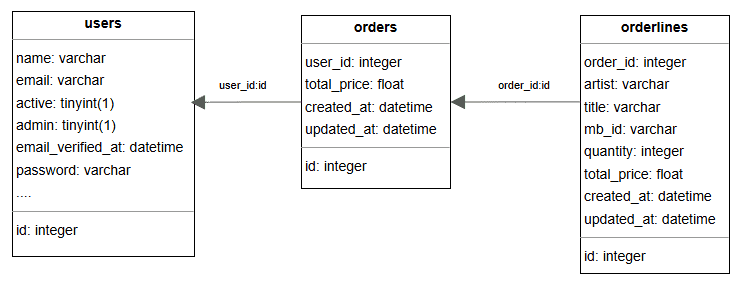
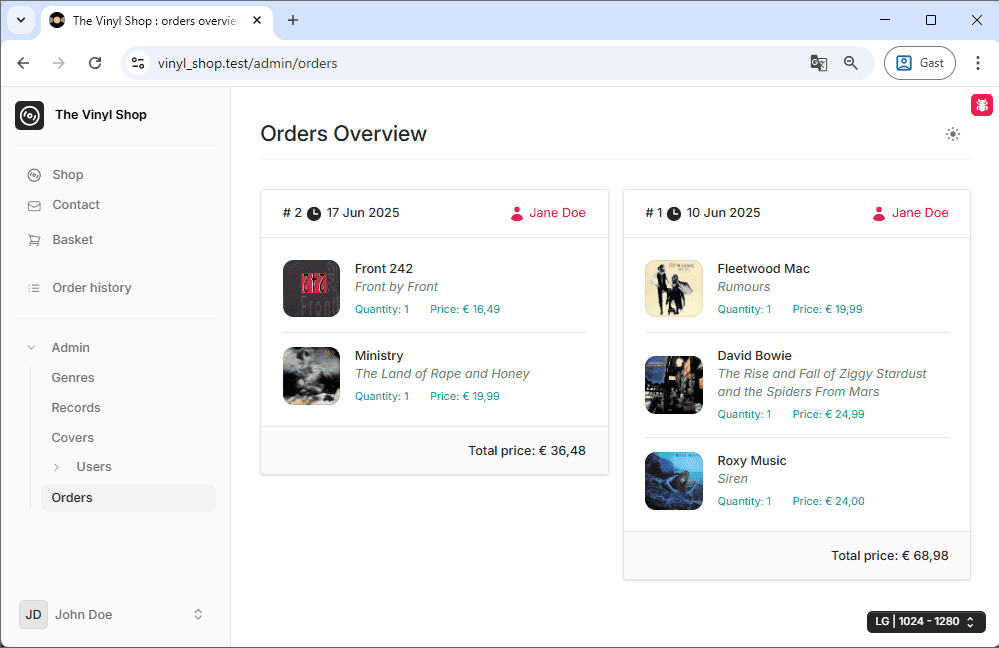
To demonstrate these concepts, we'll use a clean dataset where a user named Jane Doe (user ID 2) has placed two separate orders:
- The first
ordercontains threeorderlinesitems.- 1 x Fleetwood Mac - Rumours
- 1 x David Bowie - The Rise and Fall of Ziggy Stardust and the Spiders from Mars
- 1 x Roxy Music - Siren
- The second
ordercontains twoorderlinesitems.- 1 x Front 242 - Front by Front
- 1 x Ministry - Land of Rape and Hony
First, let's review the relationships we have already defined in our models:
- User model:
- A
Userhas manyOrderrecords.
- A
php
class User extends Authenticatable
{
    public function orders()
    {
        return $this->hasMany(Order::class);  // a user has many orders
    }
}IMPORTANT
Always use the name of the relationship method (e.g., orders, user) in the with() method, not the name of the database table!
Example Setup
To clearly illustrate the data structures returned by our queries, we will create a simple API with three endpoints. Each endpoint will demonstrate a different starting point in our relationship chain:
- Starting from
Orderline: Retrieve an orderline and fetch its parentOrderand its grandparentUser. - Starting from
User: Retrieve a user and fetch all theirOrdersand all theOrderlineswithin those orders. - Starting from
Order: Retrieve an order and fetch both its childOrderlinesand its parentUser.
Enabling API Routes in Laravel 12
By default, new Laravel 12 applications do not include the routes/api.php file. To enable API routing, we first need to install the necessary components using an Artisan command.
- Open your terminal and run the following command:
bash
php artisan install:apiDon't forget to run the migration to create the necessary tables. (Type y to confirm.)
This command will create the routes/api.php file and add the necessary configuration to your application's bootstrap file to load these routes, typically with Sanctum middleware for authentication.
Don't forget to run the migration to create the necessary tables. (Type y or yes to confirm.)
Defining the API Endpoints
With our API routes enabled, let's define our three endpoints. For this demonstration, we'll use simple closures directly in the routes/api.php file. The screen captures below use the JSON Viewer Pro Chrome extension for readability.
IMPORTANT!
These demonstration endpoints are not protected by authentication middleware and are publicly accessible. Do not use this code in a production environment without implementing proper security.
- Open the newly created
routes/api.phpfile and add the three routes. - Each route uses a closure to fetch and return all items from the corresponding model.
- Routes defined here are automatically prefixed with
/api, so theorderlinesroute is accessible at/api/orderlines.
php
<?php

use App\Models\Order;
use App\Models\Orderline;
use App\Models\User;
use Illuminate\Http\Request;
use Illuminate\Support\Facades\Route;

Route::get('orderlines', function () {
    return Orderline::get();
});

Route::get('users', function () {
    return User::get();
});

Route::get('orders', function () {
    return Order::get();
});

Route::get('/user', function (Request $request) {
    return $request->user();
})->middleware('auth:sanctum');Retrieving Data from the Chain
Now, let's modify our endpoints to use Eloquent's eager loading. This is the key to efficiently fetching related data.
- Line 2 & 7: To load nested relationships (a "chain"), we use dot notation.
order.usertells Eloquent to load theorderrelationship, and then on that order, load itsuserrelationship.orders.orderlinestells Eloquent to load theordersrelationship, and then on each order, load itsorderlines
- Line 12: To load multiple relationships at the same level, we simply pass them as separate arguments to the
with()method.
php
Route::get('orderlines', function () {
    return Orderline::with('order.user')
        ->get();
});

Route::get('users', function () {
    return User::with('orders.orderlines')
        ->get();
});

Route::get('orders', function () {
    return Order::with('orderlines', 'user')
        ->get();
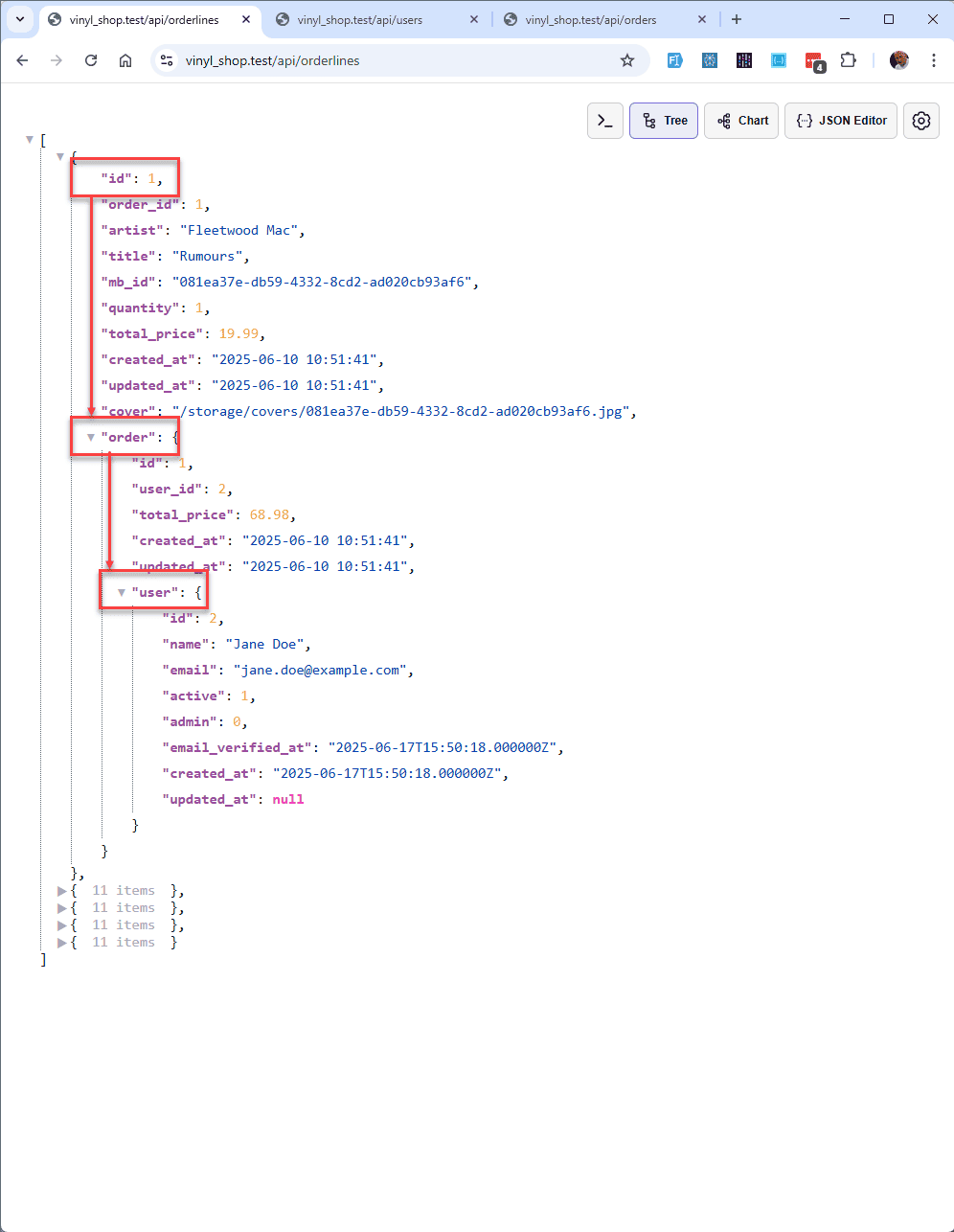
});- Result: The
userobject is nested inside theorderobject, which is nested inside eachorderline.
Skipping a Level with hasManyThrough
Sometimes you need to retrieve a distant relationship without loading the intermediate model. For example, what if we want all orderlines for a user without needing the orders data in between? Eloquent provides the hasManyThrough relationship for exactly this purpose.
First, we must define this new relationship on the User model.
- We add a new
orderlines()method to theUsermodel. - The
hasManyThroughmethod takes two arguments: the final model we want (Orderline::class) and the intermediate model (Order::class).
php
class User extends Authenticatable
{
    ...

    public function orders()
    {
        return $this->hasMany(Order::class);  // a user has many orders
    }

    public function orderlines()
    {
        return $this->hasManyThrough(Orderline::class, Order::class);  // a user has many orderlines through the orders
    }

    ...
}Skip more than one level?
- Eloquent's native
hasManyThroughonly supports skipping one intermediate model. For more complex "deep" relationships, you may need to use a third-party package like: - staudenmeir/eloquent-has-many-deep
- staudenmeir/belongs-to-through
Restricting Columns from Related Tables
Often, you don't need every single column from a related table. Selecting only the columns you need can make your API responses smaller and more efficient.
firstOrFail()
Let's start by modifying our orderlines endpoint to fetch only the first record, making the JSON response easier to inspect.
- Replace
get()withfirstOrFail()to retrieve a singleOrderlinemodel.
php
Route::get('orderlines', function () {
    return Orderline::with('order.user')
        ->firstOrFail();
});Select Specific Columns in Nested Relationships
Now, we can specify which columns to select from our eager-loaded relationships. The syntax is relation:column1,column2.
- We change the
with()call to an array syntax. order:id,user_id,total_price: From theorderrelationship, we select only theid,user_id, andtotal_pricecolumns. Crucially, you must always select the foreign key (user_id) used in the next nested relationship.order.user:id,name,email: From the nesteduserrelationship, we selectid,name, andemail.
php
Route::get('orderlines', function () {
    return Orderline::with([
            'order:id,user_id,total_price',
            'order.user:id,name,email'
        ])
        ->firstOrFail();
});Hide Properties
You can also hide properties from the main model you are querying using the makeHidden() method.
- We chain
makeHidden()to the end of our query, passing an array of property names to exclude from the final output.
php
Route::get('orderlines', function () {
    return Orderline::with([
            'order:id,user_id,total_price',
            'order.user:id,name,email'
        ])
        ->firstOrFail()
        ->makeHidden(['mb_id', 'total_price', 'created_at', 'updated_at', 'cover']);
});Adding Constraints to Eager Loading
What if you need to add more complex conditions to your eager-loaded relationships, like sorting or filtering? You can achieve this by passing a closure to the with() method.
Suppose we want to fetch a user, their orders, and their orderlines, but we want the orderlines to be sorted by artist name instead of the default ID.
First, let's set up the base query to fetch user 2 and see the default order.
- We'll modify the
usersendpoint to fetch a single user and select specific columns for clarity.
php
Route::get('users', function () {
    return User::select(['id', 'name'])
        ->with([
            'orders:id,user_id',
            'orders.orderlines:id,order_id,artist,title,mb_id'
        ])
        ->findOrFail(2);
});Now, let's add a closure to customize the orders.orderlines query.
- Instead of passing a string to define the columns for
orders.orderlines, we pass a closure. - The
$queryvariable inside the closure is an Eloquent query builder instance for theorderlinesrelationship. - We can chain any query builder methods we need, such as
select()andorderBy().
php
Route::get('users', function () {
    return User::select(['id', 'name'])
        ->with([
            'orders:id,user_id',
            'orders.orderlines' => function ($query) {
                $query->select(['id', 'order_id', 'artist', 'title', 'mb_id'])
                    ->orderBy('artist');
            },
        ])
        ->findOrFail(2);
});