
Appearance
Shop: Detail Section
REMARKS
This is Part 2 of the Shop implementation.
- Part 1: Displaying records with pagination (previous chapter).
- Part 2: Showing record details (tracks) in a modal when a record is clicked (this chapter).
- Part 3: Adding filtering and sorting functionality (next chapter).
In the previous chapter, we successfully displayed a paginated list of vinyl records. Now, we'll enhance the user experience by allowing them to view more details about a specific record. When a user clicks the "Show tracks" icon on a record card, a modal window will appear, displaying the tracklist for that album.
Interestingly, the track information isn't stored directly in our local records database table. Instead, we'll fetch this data dynamically from an external source: the MusicBrainz API. Each record in our database has a mb_id (MusicBrainz ID) attribute, which serves as a unique identifier for the album on MusicBrainz.
For example, the album Rumours by Fleetwood Mac has the mb_id value 081ea37e-db59-4332-8cd2-ad020cb93af6. We can use this ID to construct an API request URL like this:
https://musicbrainz.org/ws/2/release/081ea37e-db59-4332-8cd2-ad020cb93af6?inc=recordings&fmt=json
The JSON response from this URL contains detailed information about the release, including the tracklist. We will parse this response to extract the track position, title, and length, and then present this information neatly within our modal.
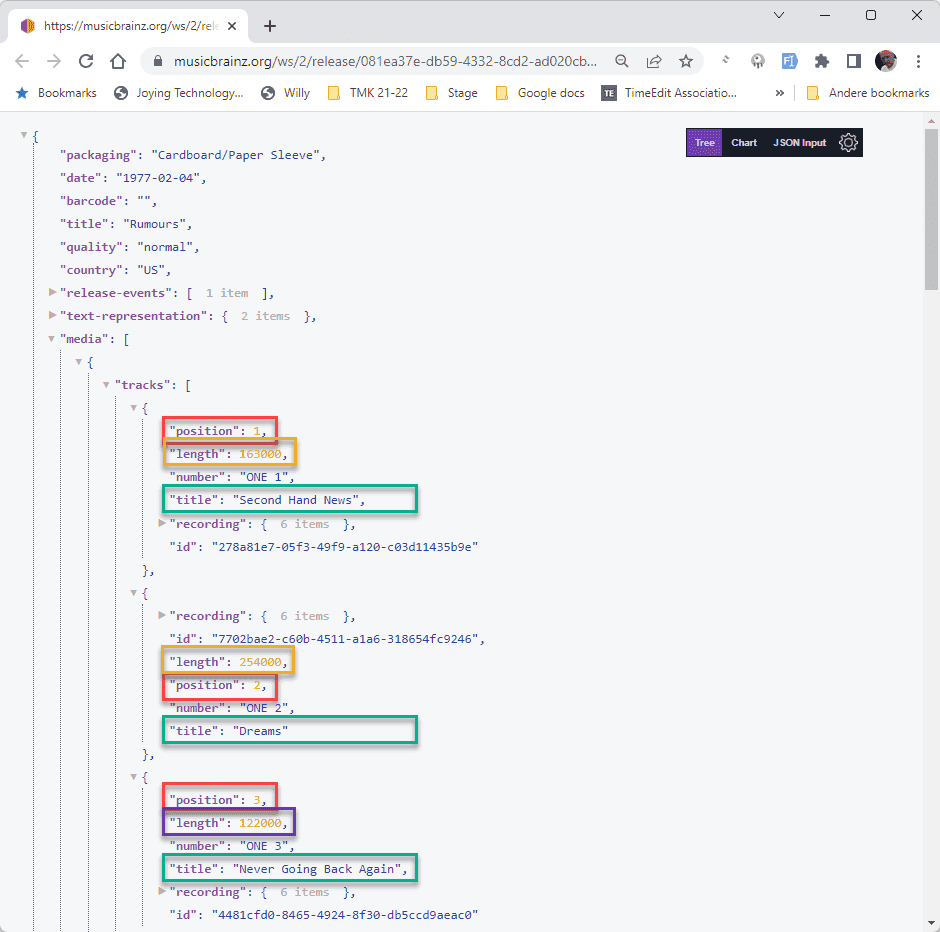
Triggering the Detail View
To initiate the process of showing the track details, we first need to capture the user's click action on the appropriate button and identify which record they are interested in. We'll use Livewire's wire:click directive for this.
Pass the Record ID to Component Methods
We'll attach wire:click handlers to both the "Show tracks" and "Add to basket" icons within our record card loop. This directive allows us to call methods directly within our Shop Livewire component class when the corresponding element is clicked. We will pass the unique id of the record as an argument to these methods.
For now, the addToBasket method will simply display a JavaScript alert informing the user that the basket functionality hasn't been implemented yet. The showTracks method will be responsible for fetching the data for the clicked record and preparing it for display.
Initially, let's set up the showTracks method to receive the record's id and store it in a new public property within our component class called $selectedRecord. We'll also add the basic addToBasket method.
- resources/views/livewire/shop.blade.php:
- Locate the
<flux:button>elements for "Add to basket" and "Show tracks". - Add the
wire:clickdirective to both buttons. - For the "Add to basket" button, set
wire:click="addToBasket({{ $record->id }})". - For the "Show tracks" button, set
wire:click="showTracks({{ $record->id }})".
- Locate the
- app/Livewire/Shop.php:
- Add a new public property:
public $selectedRecord;. This will hold the data of the record the user clicks on. - Define a new public method:
public function showTracks($record). Inside this method, assign the received$record(which is just the ID at this point) to the$selectedRecordproperty:$this->selectedRecord = $record;. - Define another new public method:
public function addToBasket($record). Inside this method, use Livewire's$this->js()helper to execute JavaScript:$this->js("alert('Basket not implemented yet')");.
- Add a new public property:
After making these changes, if you click the "Show tracks" button and inspect the Livewire state using your browser's developer tools or our <x-itf.livewire-log/> component, you'll see that the $selectedRecord property now holds the id of the record you clicked. Clicking the "Add to basket" button will trigger the JavaScript alert.
php
<div class="flex space-x-2">
    @if($record->stock > 0)
        <flux:button
            wire:click="addToBasket({{ $record->id }})"
            icon="shopping-bag" tooltip="Add to basket" variant="subtle"
            class="cursor-pointer border border-zinc-200 dark:border-zinc-700"/>
    @else
        <flux:button
            icon="shopping-bag" tooltip="Out of stock" variant="subtle"
            class="cursor-pointer border border-zinc-200 dark:border-zinc-700 text-red-200! dark:text-red-700/75!"/>
    @endif
    <flux:button
        wire:click="showTracks({{ $record->id }})"
        icon="musical-note" tooltip="Show tracks" variant="subtle"
        class="cursor-pointer border border-zinc-200 dark:border-zinc-700"/>
</div>Using Route Model Binding for Convenience
While passing the ID works, it means that inside our showTracks method, we would typically need to perform another database query to fetch the full Record object using that ID (Record::find($recordId)). Laravel and Livewire offer a more elegant solution called Route Model Binding.
By type-hinting the method parameter with the Eloquent model class (Record), Livewire automatically queries the database and injects the corresponding model instance directly into the method. This eliminates the need for manual fetching.
- app/Livewire/Shop.php:
- Modify the signature of the
showTracksmethod: changepublic function showTracks($record)topublic function showTracks(Record $record). - Modify the signature of the
addToBasketmethod: changepublic function addToBasket($record)topublic function addToBasket(Record $record).
- Modify the signature of the
Now, when you click "Show tracks", the $record parameter inside the showTracks method will be the fully loaded Record model instance, not just its ID. Inspecting the $selectedRecord property in the debug log will confirm this – you'll see all the attributes of the selected record object.
php
class Shop extends Component
{
    use WithPagination;

    public $perPage = 6;
    public $selectedRecord;

    public function showTracks(Record $record): void    // Type-hint the parameter with the Record model
    {
        $this->selectedRecord = $record;
    }

    public function addToBasket(Record $record): void     //  Type-hint the parameter here as well
    {
        $this->js("alert('{$record->title} - Basket not implemented yet')"); //   Example: Use record data
    }

    public function render()
    {
        $records = Record::orderBy('artist')
            ->orderBy('title')
            ->paginate($this->perPage);

        return view('livewire.shop', compact('records'));
    }
}Showing Tracks in a Modal
With the complete $selectedRecord object readily available after a click, our next step is to display its details, particularly the tracks, in a pop-up modal window. We'll use the Modal component from the Flux UI library we integrated earlier.
Add the Modal Structure
First, we need to define the HTML structure for our modal within the shop.blade.php view. This modal will initially be hidden and will only appear when triggered by our showTracks method. Inside the modal, we'll display the record's cover image, artist, and title, followed by a table to list the tracks. We use the name attribute on the flux:modal component (name="tracksModal") so we can specifically target and control this modal from our component class. We also use the null coalescing operator (??) and provide default values (like the placeholder cover image path or empty strings) to prevent errors when the page initially loads before any $selectedRecord has been set.
- resources/views/livewire/shop.blade.php:
- Find the comment
{{-- Detail Modal will go here --}}. - Add the
<flux:modal>component below it. Give it aname="tracksModal"and optionally set a width using Tailwind classes (e.g.,class="w-[500px]"). - Inside the modal, add structure to display the cover (
$selectedRecord->cover ?? ...), artist ($selectedRecord->artist ?? ''), and title ($selectedRecord->title ?? ''). - Add an
@isset($selectedRecord->tracks)block. Inside this block, add the<x-ift.table>component with<thead>(for headers:#,TrackandLength) and<tbody>. - Inside the
<tbody>, use an@foreach($selectedRecord->tracks as $track)loop to iterate over the tracks (once we fetch them). Create table rows (<tr>) and cells (<td>) to display$track['position'],$track['title'], and$track['length'].
- Find the comment
Open the Modal from the Component
Now that the modal structure exists in the view, we need to tell it to open when the showTracks method is executed. We can do this using the Flux facade provided by the Flux UI package. The Flux::modal('modalName')->show() method targets the modal with the specified name and makes it visible.
- app/Livewire/Shop.php:
- Import the
Fluxfacade at the top:use Flux;. - Inside the
showTracks(Record $record)method, after assigning the record to$this->selectedRecord, add the line:Flux::modal('tracksModal')->show();.
- Import the
Now, clicking the "Show tracks" button will not only load the record data into $selectedRecord but also open the modal. Initially, the track table will be empty because we haven't fetched the tracks yet.
php
{{-- Detail Modal will go here --}}
<flux:modal name="tracksModal" class="w-[500px]">
    <div class="flex items-top border-b border-zinc-300 pb-2 gap-4">
        <img class="size-24"
             src="{{ $selectedRecord->cover ?? asset('storage/covers/no-cover.png') }}" alt="">
        <div>
            <flux:heading size="lg">{{ $selectedRecord->artist ?? '' }}</flux:heading>
            <flux:subheading>{{ $selectedRecord->title ?? '' }}</flux:subheading>
        </div>
    </div>
    @isset($selectedRecord->tracks)
        <x-itf.table cols="w-8, w-auto, w-24">
            <thead>
            <tr>
                <th>#</th>
                <th>Track</th>
                <th>Length</th>
            </tr>
            </thead>
            <tbody>
            @foreach($selectedRecord->tracks as $track)
                <tr class="border-t border-zinc-100">
                    <td>{{ $track['position'] }}</td>
                    <td>{{ $track['title'] }}</td>
                    <td>{{ $track['length'] }}</td>
                </tr>
            @endforeach
            </tbody>
        </x-itf.table>
    @endif
</flux:modal>Fetching Tracks from the MusicBrainz API
The core of the detail view is fetching the actual tracklist. We'll use Laravel's built-in HTTP Client, which provides a convenient wrapper around Guzzle or PHP's stream functions for making HTTP requests.
Inside the showTracks method, before showing the modal, we will:
- Construct the API URL using the
$record->mb_idproperty. - Use
Http::get($url)to send a GET request to the MusicBrainz API endpoint. - Call
->json()on the response object to automatically decode the JSON response into a PHP array. - Navigate through the resulting array structure to extract the list of tracks. Based on the MusicBrainz JSON structure, this is typically found under
$response['media'][0]['tracks']. - Store this extracted
$tracksarray as a new, dynamic property on our$selectedRecordobject. We can simply assign it like:$this->selectedRecord->tracks = $tracks;. This makes the$tracksdata available within the modal's Blade template via$selectedRecord->tracks.
- app/Livewire/Shop.php:
- Import the HTTP facade at the top:
use Http;. - Inside the
showTracksmethod, before theFlux::modal('tracksModal')->show();line:- Define the
$urlusing the record'smb_id. - Make the HTTP GET request and decode the JSON response:
$response = Http::get($url)->json();. - Extract the tracks array:
$tracks = $response['media'][0]['tracks'] ?? [];(using?? []as a fallback in case the structure is unexpected). - Assign the extracted tracks to the selected record:
$this->selectedRecord->tracks = $tracks;.
- Define the
- Import the HTTP facade at the top:
Now, when the modal opens, the @isset($selectedRecord->tracks) condition in the view will be true, and the @foreach loop will iterate over the fetched tracks, displaying their position and title. The length will still be shown as raw milliseconds.
$response['media'][0]['tracks'] contains the tracklist. 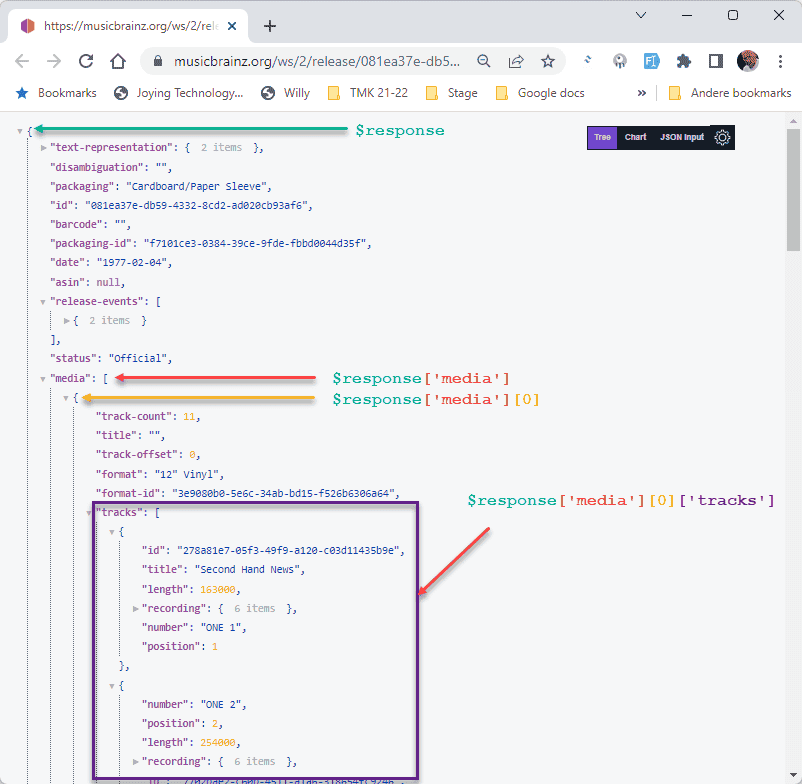
Formatting the Track Length with Carbon
The final refinement is to format the track length, which the MusicBrainz API provides in milliseconds, into a more human-readable minutes:seconds format (e.g., 03:45). While we could write a custom function for this conversion, Laravel ships with the powerful Carbon date and time manipulation library, which makes this task straightforward.
We'll use Carbon's createFromTimestampMs() method to create a Carbon instance from the millisecond value, and then use the format() method with the format string 'i:s' (where i represents minutes with leading zeros and s represents seconds with leading zeros).
To apply this formatting, we need to loop through the $tracks array after fetching it from the API but before assigning it to$this->selectedRecord->tracks. Inside the loop, we'll overwrite the original length value in milliseconds with the newly formatted mm:ss string.
- app/Livewire/Shop.php:
- Import the Carbon class at the top:
use Carbon\Carbon;. - Inside the
showTracksmethod, locate the line where$tracksis extracted ($tracks = $response['media'][0]['tracks'] ?? [];). - After that line, but before
$this->selectedRecord->tracks = $tracks;, insert aforeachloop to iterate through the$tracksarray by reference (using&$track) or by key.- Inside the loop, re-assign the
lengthkey:$tracks[$key]['length'] = Carbon::createFromTimestampMs($track['length'] ?? 0)->format('i:s');.
We use?? 0to handle cases where length might be missing or null in the API response.
- Inside the loop, re-assign the
- Import the Carbon class at the top:
With this change, the modal will now display the track lengths in the desired mm:ss format.
php
<?php

namespace App\Livewire;

use App\Models\Record;
use Carbon\Carbon;
use Flux;
use Http;
use Livewire\Component;
use Livewire\WithPagination;

class Shop extends Component
{
    use WithPagination;

    public $perPage = 6;
    public $selectedRecord;

    public function showTracks(Record $record): void
    {
        $this->selectedRecord = $record;

        $url = "https://musicbrainz.org/ws/2/release/{$record->mb_id}?inc=recordings&fmt=json";
        try {
            $response = Http::timeout(10)->get($url)->json();
            $tracks = $response['media'][0]['tracks'] ?? [];    // Get the tracks from the response, provide default empty array if not found

            foreach ($tracks as $key => $track) {           //   Convert milliseconds to mm:ss format using Carbon
                $milliseconds = $track['length'] ?? 0;      // Use null coalescing for safety if the length is missing
                $tracks[$key]['length'] = Carbon::createFromTimestampMs($milliseconds)->format('i:s');
            }

            $this->selectedRecord->tracks = $tracks;            // Add the tracks to $selectedRecord
        } catch (\Exception $e) {
            report($e);                         // Handle exceptions (e.g., timeout, network error, invalid JSON)
            $this->selectedRecord->tracks = []; // Set tracks to empty on error
        }

        // Show the modal with the name attribute "tracksModal"
        Flux::modal('tracksModal')->show();
    }

    public function addToBasket(Record $record): void { /* ... */ }
    public function render() { /* ... */ }
}Now, when users click the "Show tracks" button, they are presented with a clean modal displaying the album details and a properly formatted tracklist fetched dynamically from MusicBrainz.