Appearance
Admin: Managing Records
This chapter guides you through creating a administrative interface for managing your vinyl shop's records. While we previously touched upon a basic record listing in the "Eloquent Models" section, that was primarily to demonstrate database interactions. Here, we'll build a fully functional CRUD (Create, Read, Update, Delete) system for records, leveraging the power and elegance of Livewire 3 and its integrated form objects.
Livewire Form objects are a significant enhancement for handling complex forms, offering a structured way to manage form state, validation, and submission logic separately from your main Livewire component. This approach keeps your components lean and focused on application flow, while abstracting form-specific concerns into dedicated, reusable classes.
REMARK
Remember that you can always reset the database to its initial state by running the command:
bash
php artisan migrate:fresh --seedPreparation
Before diving into the CRUD logic, we need to set up the basic structure for our record management page. This involves creating the Livewire component, defining a route to access it, linking it from the admin navigation, and scaffolding the initial view.
Create the Records Component
We'll encapsulate the record management logic and presentation within a dedicated Livewire component. To keep our admin features organized, we'll place this component within an Admin subdirectory.
- Open your terminal in the project directory.
- Execute the following Artisan command to generate a new Livewire component named
Admin/Records:
bash
php artisan livewire:make Admin/RecordsThis command conveniently creates two essential files for us:
app/Livewire/Admin/Records.php: The component's PHP class, acting as the controller for our admin page. It starts with arender()method responsible for returning the view.resources/views/livewire/admin/records.blade.php: The component's Blade view file, where we'll define the HTML structure for displaying and interacting with records.
About the Route
TIP
In a previous chapter, we defined a named route admin.records in our routes/web.php file. Now that we've created a dedicated Admin\Records Livewire component, we simply need to update the route definition to point to this new component Record:Route::get('records', Records::class)->name('admin.records')
Because our navigation bar already uses route('admin.records'), we don't need to make any changes there. This is a perfect example of why named routes are so powerful: they decouple our application's URLs from the code that generates them, making our code much easier to maintain.
Basic Scaffolding for the View
With the component and route ready, let's set up the initial structure for the records.blade.php view. We'll define the page title and description using named slots, add filtering controls, a "New Record" button, and set up the basic table structure where records will be listed. We'll also define the initial public properties in the Records component class that will be bound to these view elements.
- app/Livewire/Admin/Records.php:
- Add public properties to control filtering (
$filter,$noStock,$noCover) and pagination ($perPage). Initialize them with default values.
- Add public properties to control filtering (
- resources/views/livewire/admin/records.blade.php:
- Add
<x-slot>directives for thetitleanddescription. - Use a container (
@container) and a grid layout to arrange filter inputs and buttons. - Include a
<flux:input>for text filtering, bound to$filterwith live debounce for performance. - Add two
<flux:switch>components for toggling "No stock" and "No cover" filters, bound to$noStockand$noCoverrespectively with live updates. - Include a
<flux:button>for "New Record". - Use the custom
<x-itf.table>component to define the table structure with placeholder headers for ID, Cover, Price, Stock, and cel for a select menu. - Include a
<flux:select>within a table header for "Records per page", bound to$perPage. - Add a placeholder table row (
<tr>) to visualize the structure and aflux:button.groupfor actions Edit, Cover, Delete.
(The cover button will be implemented later in this course, so for now, it can be a placeholder.) - Include the
<x-itf.livewire-log/>component at the end for debugging.
- Add
php
<?php

namespace App\Livewire\Admin;

use Livewire\Component;

class Records extends Component
{
    // filter and pagination
    public $filter;
    public $noStock = false;
    public $noCover = false;
    public $perPage = 5;

    public function render()
    {
        return view('livewire.admin.records');
    }
}Read All Records
The first step in managing records is displaying the existing ones. We'll modify our Livewire component to fetch record data from the database, apply pagination, and pass it to the view, which will then render it in the table. We'll also start integrating our filtering capabilities.
Show All Records in the Table
We'll query the Record model in the render() method, apply default sorting, and paginate the results before passing them to the Blade view. The view will then loop through this data to build the table rows, displaying information like cover, price, stock, artist, title, and genre.
- app/Livewire/Admin/Records.php:
- Import the
App\Models\RecordandLivewire\WithPaginationclasses. - Include the
WithPaginationtrait within the class definition. - In the
render()method, query theRecordmodel, order byartistand thentitle. - Use
->paginate($this->perPage)to fetch paginated results based on the$perPageproperty. - Pass the fetched
$recordscollection to the view usingcompact('records').
- Import the
- resources/views/livewire/admin/records.blade.php:
- Add
$records->links()before the table to display pagination navigation. - Inside the
<tbody>tag, add Blade@forelse($records as $record)loop around the<tr>elements. The@forelsedirective is useful here as it allows an@emptyblock to be rendered if the$recordscollection is empty. - Add the
wire:key="{{ $record->id }}"directive to the<tr>element inside the loop. This is crucial for Livewire's DOM diffing and updating mechanism, ensuring efficient updates when the data changes. - Populate the table cells (
<td>) with dynamic data from the$recordobject:$record->id,$record->cover,$record->price(formatted withNumber::currency),$record->stock,$record->artist,$record->title, and$record->genre_name. - Pass the
$recordscollection to the debugging component:<x-itf.livewire-log :records="$records" />. - Add a conditional
@if($perPage >= 10)for the bottom pagination links to only show them if there are enough records per page to warrant it (e.g., to avoid duplicate pagination if all records fit on one page).
- Add
php
<?php

namespace App\Livewire\Admin;

use App\Models\Record;
use Livewire\Component;
use Livewire\WithPagination;

class Records extends Component
{
    use WithPagination;

    // filter and pagination
    public $filter;
    public $noStock = false;
    public $noCover = false;
    public $perPage = 5;

    public function render()
    {
        $records = Record::orderBy('artist')
            ->orderBy('title');
        $records = $records->paginate($this->perPage);
        return view('livewire.admin.records', compact('records'));
    }
}$records query in two steps?
In the next steps, we need some conditional logic (if-statements) before we can paginate the $records query. That's why we need to split the query into multiple steps: first, we filter the records, then comes the if-statements, and finally we paginate the results.
Filter by Artist or Title
We'll integrate the text filter ($this->filter) into our Eloquent query. As discussed in the "Shop: Master Section" chapter, it's best practice to encapsulate such reusable filter logic in a Query Scope within the model itself. This keeps our Livewire component's render() method clean and readable.
The searchTitleOrArtist scope, which checks both title and artist fields for the provided search term, is already defined in our App\Models\Record model from the Shop: Filter chapter. We simply need to apply it here.
- app/Livewire/Admin/Records.php:
- Inside the
render()method, chain thesearchTitleOrArtist($this->filter)scope onto theRecordquery builder. This will dynamically filter the records as the user types into the search input.
- Inside the
php
public function render()
{
    // filter by artist or title
    $records = Record::orderBy('artist')
        ->orderBy('title')
        ->searchTitleOrArtist($this->filter);
    // paginate the $records
    $records = $records->paginate($this->perPage);
    return view('livewire.admin.records', compact('records'));
}Filter by Records That Are Out of Stock
Adding a filter for records that are out of stock is straightforward. We simply add a where clause to our query, conditional on the $noStock public property being true.
- app/Livewire/Admin/Records.php:
- Inside the
render()method, after applying thesearchTitleOrArtistscope, add anif ($this->noStock)condition.- If
true, chain a->where('stock', false)clause (or->where('stock', 0)) to the query builder. - If
false, the query will not filter out any records based on stock status.
- If
- Inside the
php
public function render()
{
    // Filter by artist or title
    $records = Record::orderBy('artist')
        ->orderBy('title')
        ->searchTitleOrArtist($this->filter);
    // Filter by records that are out of stock
    if ($this->noStock) {
        $records = $records->where('stock', false);
    }
    // Paginate the records
    $records = $records->paginate($this->perPage);
    return view('livewire.admin.records', compact('records'));
}Filter by Records with No Cover
Filtering by records with no cover presents a unique challenge: the cover attribute is a "generated" accessor on the Record model, meaning it's computed after the records are fetched from the database, not a direct database column. Therefore, we cannot use a simple where clause on the cover column. Instead, we need a custom query scope that checks the existence of the cover image file on the storage disk.
We'll define a scopeCoverExists method in the Record model that inspects the filesystem.
- app/Models/Record.php:
- Add the
scopeCoverExistsmethod. This method takes a boolean$existsargument. - It uses
Storage::disk('public')->exists('covers/' . $mb_id . '.jpg')to check if the cover image file exists for each record'smb_id. - It collects the
mb_ids that either have a cover or don't have a cover, and then useswhereInorwhereNotInto filter the records based on thesemb_ids.
- Add the
php
<?php
namespace App\Models;
use Illuminate\Database\Eloquent\Factories\HasFactory;
use Illuminate\Database\Eloquent\Model;
use Illuminate\Support\Facades\Storage; // Make sure to import Storage facade
class Record extends Model
{
use HasFactory;
// Other model properties and methods...
public function scopeSearchTitleOrArtist($query, $search = '') { /* ... */ }
public function scopeCoverExists($query, $exists = true)
{
// Get all record IDs that have covers based on file existence
$mb_ids_with_covers = $query->pluck('mb_id')->filter(function ($mb_id) {
return Storage::disk('public')->exists('covers/' . $mb_id . '.jpg');
})->values()->all();
REMARK
After adding a new scope to your model, it's highly recommended to run the menu Laravel > Generate Helper Code to update your IDE's auto-completion and type-hinting capabilities.
- app/Livewire/Admin/Records.php:
- Inside the
render()method, after thenoStockfilter, add anif ($this->noCover)condition.- If
true, chain->coverExists(false)to the query builder to filter for records that do not have a cover image file. - If
false, the query will not filter out any records based on cover existence.
- If
- Inside the
php
public function render()
{
    // Filter by artist or title
    $records = Record::orderBy('artist')
        ->orderBy('title')
        ->searchTitleOrArtist($this->filter);
    // Filter by records that are out of stock
    if ($this->noStock) {
        $records = $records->where('stock', false);
    }
    // Filter by records that have no cover
    if ($this->noCover) {
        $records = $records->coverExists(false);
    }
    // Paginate the records
    $records = $records->paginate($this->perPage);
    return view('livewire.admin.records', compact('records'));
}Reset Pagination After Filter
When users interact with filters or change the number of items per page, it's a good practice to reset the pagination back to the first page. This prevents the user from being left on an empty page if the filtering significantly reduces the result set. Livewire's updated() lifecycle hook is perfect for this, as it fires whenever a public property bound via wire:model changes.
(We also discussed this in the Shop: Filter Section chapter.)
- app/Livewire/Admin/Records.php:
- Add the
public function updated($propertyName, $propertyValue)method to theRecordscomponent class. - Inside this method, check if the
$propertyNameis one of the properties that should trigger a pagination reset (filter,noCover,noStock,perPage). - If it is, call
$this->resetPage(), Livewire's built-in method to reset the paginator.
php
<?php

namespace App\Livewire\Admin;

use App\Models\Record;
use Livewire\Component;
use Livewire\WithPagination;

class Records extends Component
{
    use WithPagination;

    // filter and pagination
    public $filter;
    public $noStock = false;
    public $noCover = false;
    public $perPage = 5;

    // reset the paginator
    public function updated($propertyName, $propertyValue)
    {
        // reset if the $search, $noCover, $noStock or $perPage property has changed (updated)
        if (in_array($propertyName, ['filter', 'noCover', 'noStock', 'perPage']))
            $this->resetPage();
    }

    public function render() { /* ... */ }
}Introduction to Livewire Form Objects
In previous chapters, we managed form input elements directly as public properties within the Livewire component class itself. While this approach is perfectly adequate for simpler forms, it can lead to cluttered component classes as forms grow in complexity, with numerous properties and validation rules.
For more sophisticated forms, Livewire 3 introduces a powerful feature: Livewire Form objects . A Livewire Form object is a dedicated class designed to encapsulate all logic related to a specific form, including:
- Public properties: These represent the form's input elements, much like regular Livewire component properties.
- Validation rules: Each property can have its validation rules defined directly within the form object, either using Livewire's
#[Validate]attributes or arules()method. - Submission methods: Methods like
create()orupdate()can be defined within the form object to handle the logic of persisting data, often including calling$this->validate(). (Read and delete operations typically don't require validation and are usually handled directly by the main component). - Notifications: Form objects can dispatch events from our
NotificationsTraitto send feedback, such as toast messages, to the user.
Why Use a Form Object?
The primary advantage of a Form object is improved code organization and reusability. It helps keep your main component class clean and focused on managing the overall page state and user interactions, while all form-specific concerns are neatly grouped in a separate, testable class. This separation of concerns leads to more maintainable and scalable applications.
It's important to note that a Form object is not a full-blown Livewire component. It doesn't have its own view file, nor does it possess lifecycle methods like render() or mount(). It serves as a specialized helper class that is instantiated and managed by a Livewire component.
Create a New Form Object
Let's create a dedicated Form object for our record management.
- Create a form object class for the records with the Artisan command
php artisan livewire:form RecordForm. - This will create a new class file
app/Livewire/Forms/RecordForm.php. - Open the file and replace its content with the following code. This
RecordFormclass defines the properties that will correspond to our record input fields, their validation rules, and methods for creating and updating records.
php
<?php
namespace App\Livewire\Forms;
use App\Models\Record;
use Livewire\Attributes\Validate;
use Livewire\Form;
class RecordForm extends Form
{
public $id = null;
#[Validate('required', as: 'name of the artist')]
public $artist = null;
#[Validate('required', as: 'title for this record')]
public $title = null;
#[Validate('required|size:36|unique:records,mb_id,id', as: 'MusicBrainz ID')] // Unique validation will be handled dynamically later
public $mb_id = null;
#[Validate('required|numeric|min:0')]
public $stock = null;
#[Validate('required|numeric|min:0')]
public $price = null;
#[Validate('required|exists:genres,id', as: 'genre')]
public $genre_id = null;
public $cover = '/storage/covers/no-cover.png';
The code in this Form object defines the structure of our record data and the basic create and update logic.
- Properties: Each public property (
$id,$artist,$title, etc.) will hold the data from the form inputs. #[Validate]Attributes: These attributes define the validation rules for each property. For instance:$artistand$titlearerequired.$mb_idisrequiredand must be exactly36characters long and must beunique.$stockand$pricearerequired,numeric, and must be at least0.$genre_idisrequiredand must correspond to anidthatexistsin thegenrestable.create()method: This method performs validation on all properties (implicitly defined by#[Validate]) and then creates a newRecordentry in the database.update()method: This method finds the record by$this->id, performs validation, and then updates thestock,price, andgenre_idfields. Theartist,title, andmb_idfields are typically not updated through this form as they come from MusicBrainz and uniquely identify the record.
Use the Form Object in the Component Class
With the RecordForm object created, we can now integrate it into our Records Livewire component. This allows the component to access and manage the form's state and logic.
- Add the following code to the component class
app/Livewire/Admin/Records.php:- Import the
App\Livewire\Forms\RecordFormclass. - Declare a public property
public RecordForm $form;. Livewire will automatically instantiate this form object for you.
- Import the
php
<?php

namespace App\Livewire\Admin;

use App\Livewire\Forms\RecordForm;
use App\Models\Record;
use Livewire\Component;
use Livewire\WithPagination;

class Records extends Component
{
    use WithPagination;

    // filter and pagination
    public $filter;
    public $noStock = false;
    public $noCover = false;
    public $perPage = 5;
    public RecordForm $form;

    public function updated($propertyName, $propertyValue) { /* ... */ }

    public function render() { /* ... */ }
}How To Use The Form Object
Once you declare public RecordForm $form; in your Livewire component, the public property $form becomes an instance of RecordForm, granting you access to all its properties and methods.
- In the Blade View:
- To display a form property's value, use
$form->propertyName, e.g.,<input value="{{ $form->title }}">. - To bind an input element to a form property for two-way data binding, use
wire:model="form.propertyName", e.g.,<flux:input wire:model="form.title" />. - To show validation error messages for a form property, use
@error('form.propertyName'), e.g.,@error('form.title') <span class="text-red-500">{{ $message }}</span> @enderror.
(FluxUI components automatically display errors by default, so you might not need explicit@errorblocks for them).
- To display a form property's value, use
- In the Livewire Component Class:
- To access a form property, use
$this->form->propertyName, e.g.,$this->form->artist. - To call a method defined in the form object, use
$this->form->methodName(), e.g.,$this->form->create().
- To access a form property, use
Create a New Record
Creating a new record involves several steps: retrieving unique record identifiers from MusicBrainz, fetching associated data, handling cover images, and finally, presenting a form for users to input price, stock, and genre before saving.
Find the MusicBrainz ID (mb_id) of the Record
Every record in our database is linked to a unique MusicBrainz ID (mb_id). This ID is crucial for consistently identifying records and fetching their canonical information (artist, title, cover art) from the MusicBrainz database. Before adding a new record, you'll need to find its mb_id.
- Go to the MusicBrainz website.
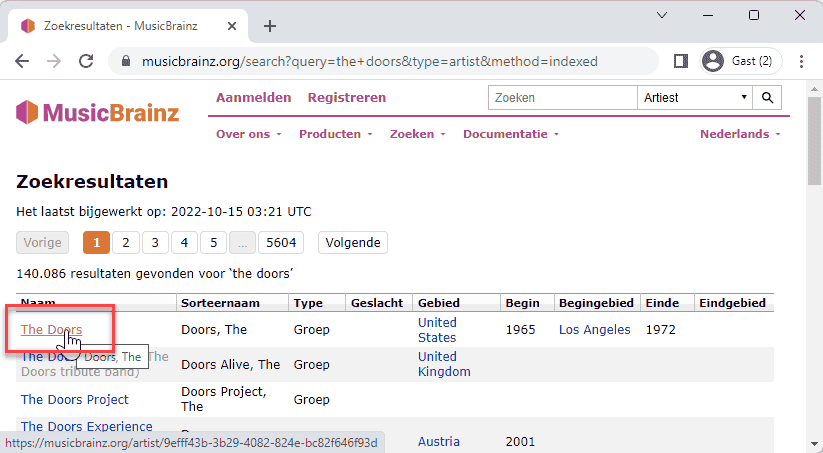
- Use the search bar in the top right corner to look for an artist (e.g., The Doors).
- Click on the artist name in the search results.
- Now, navigate to one of their albums (e.g., L.A. Woman).
- You'll see a list of releases for that album. It's important to select a release that corresponds to a vinyl format, as our shop primarily deals with vinyl.
- Once on the specific release page, the
mb_idis the unique code at the end of the URL. For example, for "The Doors - L.A. Woman", it might bee68f23df-61e3-4264-bfc3-17ac3a6f856b. This is the value you'll enter into our form.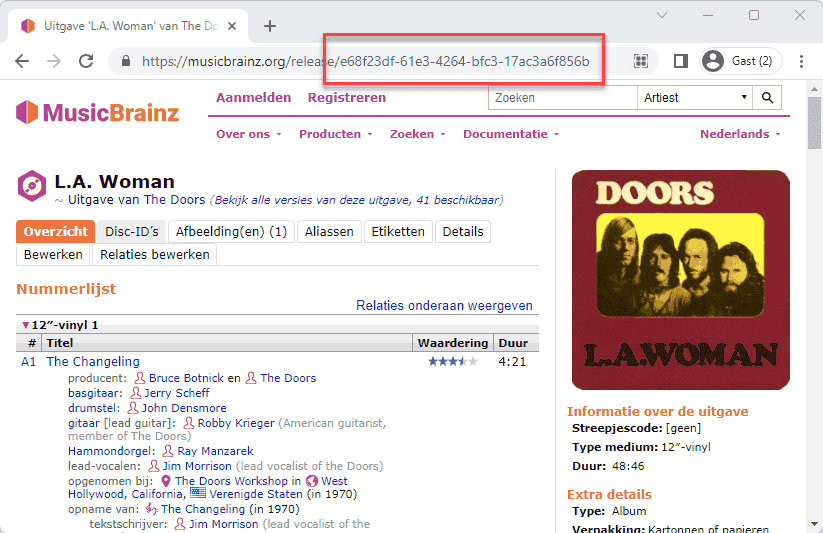
Get the Data from MusicBrainz API
With the mb_id, we can use the MusicBrainz API and the Cover Art Archive API to programmatically fetch key details of the record.
We need:
titleof the record.artistname.coverimage (if available).
These fields are typically read-only in our admin interface because they represent canonical data. We also need to input:
pricefor the record.stockquantity.genrethis record belongs to.
These fields are editable and managed by our application, unrelated to the MusicBrainz API.
Below are examples of how to access the required data from the JSON responses when querying the MusicBrainz API for a release using the inc=artists&fmt=json parameters (to include artist information and get JSON output).
- mb_id:
e68f23df-61e3-4264-bfc3-17ac3a6f856b - API Endpoint: https://musicbrainz.org/ws/2/release/e68f23df-61e3-4264-bfc3-17ac3a6f856b?inc=artists&fmt=json
$response['title']= L.A. Woman$response['artist-credit'][0]['artist']['name']= The Doors$response['cover-art-archive']['front']= true- If
true, cover is available at:
https://coverartarchive.org/release/e68f23df-61e3-4264-bfc3-17ac3a6f856b/front-250.jpg
- If
Add a Modal
We'll implement a modal form for creating new records. This modal will include:
- An input for the MusicBrainz ID (
mb_id). This field will only be visible when creating a new record. - Hidden inputs for
titleandartist(their values come from MusicBrainz API). - A select input for
genre, populated with all available genres. - Number inputs for
priceandstock. - A preview of the
coverimage.
Now, let's create and populate the modal.
- app/Livewire/Forms/RecordForm.php:
- Import
Http,Storage, andIntervention\Image\Laravel\Facades\Imagefacades. - Add a
fetchRecord()method to handle the API call to MusicBrainz, parse the JSON response, populate$artist,$title, and call a helper to fetch the cover if available. - Add a private
fetchAndStoreCover($mbId)method to download the cover image from Cover Art Archive and save it topublic/storage/covers. This method uses the Intervention/Image library to process the image (e.g., convert to JPEG and apply quality).
- Import
- app/Livewire/Admin/Records.php:
- Import
App\Models\GenreandApp\Traits\NotificationsTrait. - Include
NotificationsTraitin the class. - Add a public property
$showModal = false;to control the modal's visibility. - Implement
resetValues()to clear the form and validation errors. - Implement
newRecord()to open the modal and reset the form for a new entry. - Implement
getDataFromMusicbrainzApi()to triggerRecordForm::$this->form->fetchRecord(). - Implement
createRecord()to call$this->form->create(), close the modal, and show a success toast. - In the
render()method, fetch all genres and pass them to the view for the genre dropdown.
- Import
- resources/views/livewire/admin/records.blade.php:
- Add a
wire:click="newRecord()"to the "New Record" button. - Include a
<flux:modal>component, controlled bywire:model.self="showModal". Usevariant="flyout"(or remove it for a centered modal). - Inside the modal:
- Use
flux:headingwith a conditional ternary operator ($form->id ? 'Edit Record' : 'New Record') to display the correct title. - Conditionally display the
mb_idinput and "Get Record Info" button (@if(!$form->id)) only when creating a new record. Bind the input towire:model="form.mb_id"and the button towire:click="getDataFromMusicbrainzApi()". - Display the
artist,title, andmb_id(if present) usingflux:headingandflux:text. - Add
flux:selectforgenre_id(bound towire:model.live="form.genre_id"), populating options from the$genrescollection passed from the component. - Add
flux:inputforpriceandstock, bound towire:model.live.debounce.500ms="form.price"andwire:model.live.debounce.500ms="form.stock". - Display the cover image preview using
src="{{ $form->cover }}". - Add "Cancel" and "Save" buttons. The "Save" button's
wire:clickwill dynamically callupdateRecord()orcreateRecord()based on$form->id. - Update the
x-itf.livewire-logcomponent to also pass$genresfor debugging.
- Use
- Add a
php
<?php
namespace App\Livewire\Forms;
use App\Models\Record;
use Http;
use Intervention\Image\Laravel\Facades\Image;
use Livewire\Attributes\Validate;
use Livewire\Form;
use Storage;
class RecordForm extends Form
{
/* ... */
// create a new record
public function create() { /* ... */ }
// update the selected record
public function update() { /* ... */ }
// get artist, title and cover from the MusicBrainz API
public function fetchRecord()
{
$this->resetErrorBag();
$this->validateOnly('mb_id');
Test the Modal
Let's test the new record creation process with the modal.
If you click "Save" with empty fields (or before fetching MusicBrainz data), the validation rules defined in RecordForm will trigger, and error messages will appear. 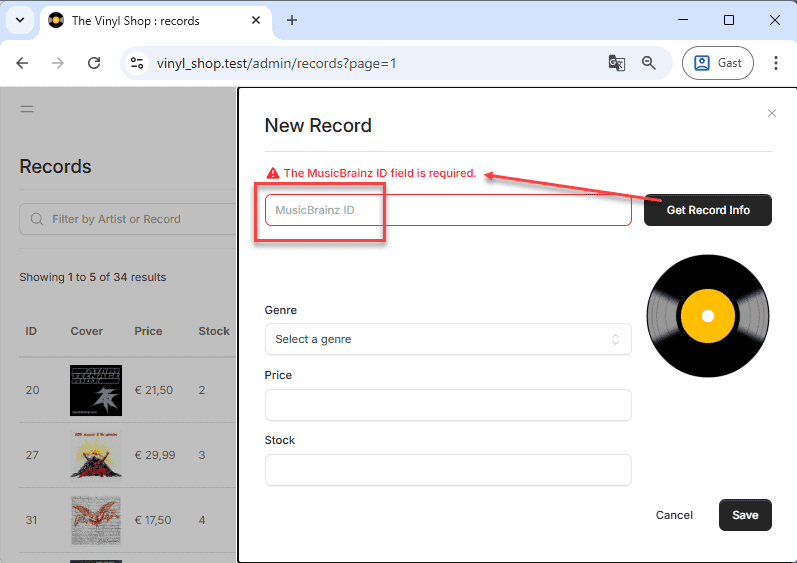
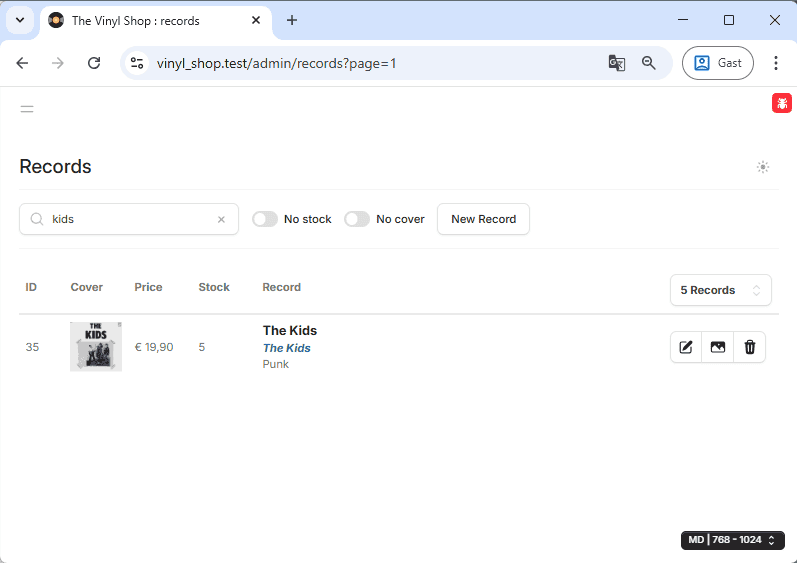
The cover for the record with MusicBrainz ID 5a4d2ec4-ed6f-47d5-9352-c11917f61dc0 should now be downloaded to your public/storage/covers directory and accessible via the URL: https://vinyl_shop.test/storage/covers/5a4d2ec4-ed6f-47d5-9352-c11917f61dc0.jpg. You should also see this new record on both the admin management page and the public shop page.
Update a Record
Updating an existing record involves pre-filling our modal form with the record's current data and then allowing the user to modify specific fields. We'll re-use the same modal we built for creating records. We're only allowing updates to the genre_id, stock, and price fields. The mb_id, title, and artist are considered canonical and remain read-only. The cover field will also remain read-only for now, with dedicated cover management functionality to be added later.
Enter Edit Mode
To enter edit mode, we'll configure the "Edit" button (icon) to populate the RecordForm with the selected record's data and then open the modal.
- resources/views/livewire/admin/records.blade.php:
- Locate the "Edit" button (
<flux:button icon="pencil-square">) inside the<tbody>loop. - Add a
wire:clickdirective to call theeditRecordmethod, passing the current record's ID:wire:click="editRecord({{ $record->id }})".
- Locate the "Edit" button (
- app/Livewire/Admin/Records.php:
- Add a public method
editRecord(Record $record). This method will receive theRecordmodel instance via Laravel's Route Model Binding. - Inside
editRecord(), call$this->resetValues()to clear any previous form state or errors. - Then, use
$this->form->fill($record);. This powerful Livewire Form method automatically fills all matching public properties in theRecordForminstance with the corresponding attributes from the$recordmodel. - Finally, set
$this->showModal = true;to display the modal. - Also, implement the
updateRecord()method. This method will be called when the user clicks the "Save" button in the modal if anidis present in the form (indicating an edit operation). It calls$this->form->update(), closes the modal, and shows an informative toast notification.
- Add a public method
php
<flux:button.group>
    <flux:button
        wire:click="editRecord({{ $record->id }})"
        tooltip="Edit"
        icon="pencil-square"/>
    <flux:button
        tooltip="Cover"
        icon="photo"/>
    <flux:button
        tooltip="Delete"
        icon="trash"/>
</flux:button.group>Fix the "unique" Validation Rule
The unique validation rule needs to be conditional: it should ensure mb_id is unique when creating a new record, but allow the mb_id to remain the same for the record being updated. The #[Validate] attribute, while convenient, can only use static values for its rules. For dynamic rules, especially those depending on the id of the current model, we need to use the rules() method within the Form object.
We also need to define custom validation attribute names if we want more user-friendly messages than the default property names (e.g., "MusicBrainz ID" instead of "mb id"). This is done using the $validationAttributes property.
- app/Livewire/Forms/RecordForm.php:
- Remove the
#[Validate]attribute from the$mb_idproperty. - Add a
public function rules()method to theRecordFormclass. This method should return an array where keys are property names and values are their validation rules. - Inside
rules(), define themb_idrule using Laravel's validation rules. Theuniquerule accepts a third parameter to specify an ID to ignore:unique:table,column,id. We will useunique:records,mb_id,{$this->id}. The$this->idwill correctly refer to theidof the record currently being updated (ornullif creating a new one). - Add a
protected $validationAttributesproperty to provide a user-friendly name formb_idin validation messages.
- Remove the
php
<?php

namespace App\Livewire\Forms;

use App\Models\Record;
use Illuminate\Support\Facades\Http;
use Illuminate\Support\Facades\Storage;
use Intervention\Image\Laravel\Facades\Image;
use Livewire\Attributes\Validate;
use Livewire\Form;

class RecordForm extends Form
{
    public $id = null;
    #[Validate('required', as: 'name of the artist')]
    public $artist = null;
    #[Validate('required', as: 'title for this record')]
    public $title = null;
    // #[Validate('required|size:36|unique:records,mb_id,id', as: 'MusicBrainz ID')]
    public $mb_id = null;
    #[Validate('required|numeric|min:0')]
    public $stock = null;
    #[Validate('required|numeric|min:0')]
    public $price = null;
    #[Validate('required|exists:genres,id', as: 'genre')]
    public $genre_id = null;
    public $cover = '/storage/covers/no-cover.png';

    // special validation rule for mb_id (unique:records,mb_id,id) for insert and update!
    public function rules()
    {
        return [
            'mb_id' => "required|size:36|unique:records,mb_id,{$this->id}",
        ];
    }

    // $validationAttributes is used to replace the attribute name in the error message
    protected $validationAttributes = [
        'mb_id' => 'MusicBrainz ID',
    ];

    // create a new record
    public function create()
    {
        $this->validate();
        Record::create([
            'artist' => $this->artist,
            'title' => $this->title,
            'mb_id' => $this->mb_id,
            'stock' => $this->stock,
            'price' => $this->price,
            'genre_id' => $this->genre_id,
        ]);
    }

    // update the selected record
    public function update()
    {
        $record = Record::findOrFail($this->id);
        $this->validate(); // Validation now includes the dynamic unique rule
        $record->update([
            'stock' => $this->stock,
            'price' => $this->price,
            'genre_id' => $this->genre_id,
        ]);
    }

    public function fetchRecord() { /* ... */ }
    private function fetchAndStoreCover($mbId) { /* ... */ }
}Delete a Record
Finally, administrators need the ability to remove records. Since deleting data is irreversible , it's crucial to ask for confirmation before proceeding. We'll implement a two-step deletion process using the confirmation dialog provided by our NotificationsTrait, similar to how genres are deleted.
- Initiate Confirmation: Clicking the "Delete" button (trash icon) will trigger a confirmation dialog asking the user if they are sure.
- Perform Deletion (if confirmed): If the user confirms the action in the dialog, a separate method will be called to actually delete the record from the database.
- resources/views/livewire/admin/records.blade.php:
- Locate the "Delete" button (
<flux:button icon="trash">) inside the<tbody>loop. - Add a
wire:clickdirective to call thedeleteConfirmmethod, passing the current record's ID:wire:click="deleteConfirm({{ $record->id }})". - Add a descriptive tooltip, e.g.,
tooltip="Delete {{ $record->title }} by {{ $record->artist }}".
- Locate the "Delete" button (
- app/Livewire/Admin/Records.php:
- Add a public method
deleteConfirm(Record $record). This method is called when the trash icon is clicked.- It uses
$this->confirm()(from theNotificationsTrait) to display the modal dialog. - Provide a descriptive confirmation message, including the record's title.
- Configure the
nextkey in the options array to dispatch a Livewire event nameddelete-recordif confirmed, passing the record's ID as a parameter ('record' => $record->id). - You can also customize the dialog's heading, confirm text, and styling.
- It uses
- Add another public method
deleteRecord(Record $record).- Add the
#[On('delete-record')]attribute above this method. This tells Livewire that this method should listen for thedelete-recordevent dispatched by the confirmation dialog. Livewire will automatically call this method, resolving therecordID from the event data to aRecordmodel instance via Route Model Binding. - Inside the method, call
$record->delete()to remove the record from the database. - Show a success toast using
$this->toastInfo()to inform the user.
- Add the
- Add a public method
php
<flux:button.group>
    <flux:button
        wire:click="editRecord({{ $record->id }})"
        tooltip="Edit"
        icon="pencil-square"/>
    <flux:button
        tooltip="Cover"
        icon="photo"/>
    <flux:button
        wire:click="deleteConfirm({{ $record->id }})"
        tooltip="Delete {{ $record->title }} by {{ $record->artist }}" {{-- Update tooltip for clarity --}}}
        icon="trash"/>
</flux:button.group>Exercises
Now that you have implemented the core CRUD functionality for records, let's refine the user experience and add additional features.
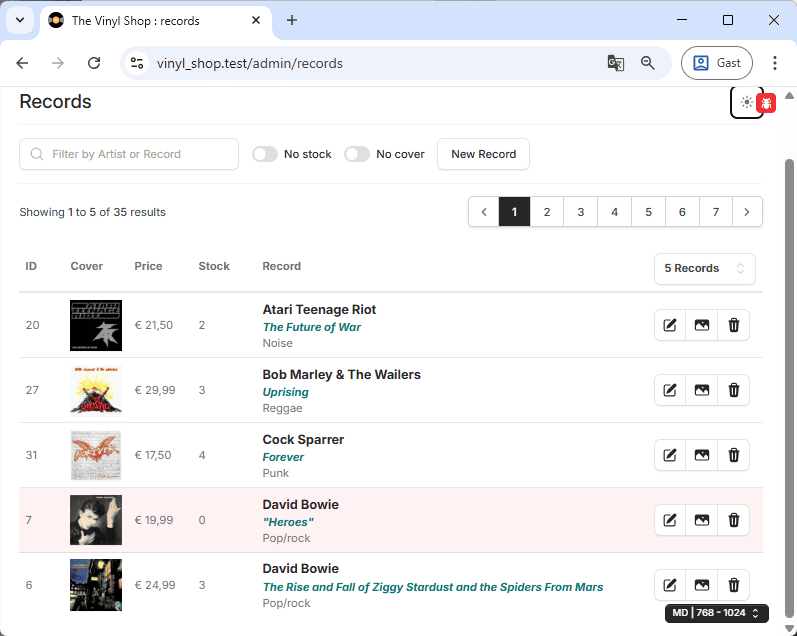
Background Color for Out of Stock Records
Give all records that are out of stock a red background color to make them visually distinct.
Delete the Cover Image from the Server
Currently, when a record is deleted, its associated cover image file remains on the server. Update the delete() method inside the RecordForm class so that the corresponding cover image file is also removed from public/storage/covers when a record is deleted.
- Hint: In the
RecordForm::delete()method, before deleting the record from the database, you'll need to check if a cover image exists for that record'smb_idin thepublic/coversdirectory usingStorage::disk('public')->exists(). If it exists, useStorage::disk('public')->delete()to remove the file. Remember to handle the case whereidmight be null (though in delete scenarios it won't be).
- Add a new record with a cover image (e.g. mb_id =
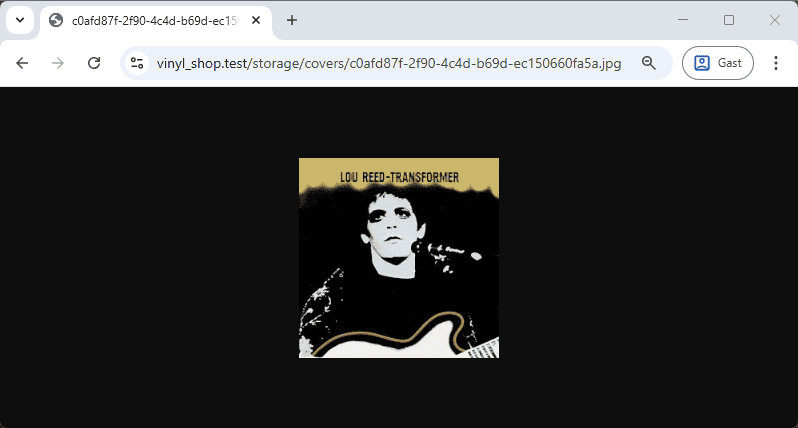
c0afd87f-2f90-4c4d-b69d-ec150660fa5a). - Open the cover in a new browser tab: https://vinyl_shop.test/storage/covers/c0afd87f-2f90-4c4d-b69d-ec150660fa5a.jpg