
Appearance
Basket
In this chapter, we'll build a complete shopping basket feature from the ground up. This is a core part of any e-commerce application, and we'll see how various Livewire and Laravel features come together to create a seamless user experience.
We will cover:
- Adding and removing records from a session-based basket.
- Displaying basket contents and totals.
- Creating a mini-basket in the navigation bar that updates in real-time.
- Implementing a checkout process with a shipping information form.
- Storing the final order in the database and updating stock levels.
- Sending an order confirmation email to the customer and administrators.
Preparation
Create the Basket Component
First, let's create the main Livewire component that will handle the shopping basket page.
- Open your terminal in the project directory.
- Execute the following Artisan command to generate a new Livewire component named
Basket:
bash
php artisan livewire:make BasketThis command creates two essential files:
app/Livewire/Basket.php: The component class where all the logic for our basket will reside.resources/views/livewire/basket.blade.php: The Blade view that will render the basket's user interface.
Add a New Route
To make our new Basket component accessible via a URL, we need to add a route to it.
- Open the
routes/web.phpfile. - Add a new route that points the
/basketURL to ourBasketcomponent class.
php
Route::view('/', 'home')->name('home');
Route::get('shop', Shop::class)->name('shop');
Route::view('contact', 'contact')->name('contact');
Route::get('basket', Basket::class)->name('basket');
...Create a Basket-log Component
During development, it's incredibly helpful to see what's happening inside our basket's session data. We'll create a dedicated debug component for this purpose.
- Create a new file inside the components folder:
resources/views/components/itf/basket-log.blade.php - Paste the following code inside the component:
basket-log.blade.php code
This (debug) code is only visible when the APP_DEBUG environment variable is set to true (not in production) and can be removed later. It uses our Cart helper to display the current state of the basket, including all records, keys, and totals.
php
@php
    use App\Helpers\Cart;
@endphp

@props([
    'record' => 15      // default value is 15
])

{{-- show this (debug) code only in development APP_ENV=local  --}}
@env('local')
    <div x-data="{ show: true }"
         class="border p-4 bg-yellow-50 dark:bg-yellow-600 mt-8">
        <p class="font-bold cursor-pointer" @click="show = !show">What's inside my basket?</p>
        <div x-show="show" x-cloak>
            @php
                $detailedCartData = [
                    'Cart::getCart()' => Cart::getCart(),
                    'Cart::getRecords()' => Cart::getRecords(),
                    'Cart::getOneRecord(' . $record . ')' => Cart::getOneRecord((int)$record),
                ];
                $inlineCartData = [
                    'Cart::getKeys()' => Cart::getKeys(),
                    'Cart::getTotalPrice()' => Cart::getTotalPrice(),
                    'Cart::getTotalQty()' => Cart::getTotalQty(),
                ];
            @endphp

            @foreach ($detailedCartData as $label => $data)
                <hr class="my-4">
                <p class="text-rose-800 dark:text-red-100 font-bold">{{ $label }}:</p>
                <pre class="text-sm">@json($data, JSON_PRETTY_PRINT)</pre>
            @endforeach

            <hr class="my-4">
            @foreach ($inlineCartData as $label => $data)
                <p>
                    <span class="text-rose-800 dark:text-red-100 font-bold pr-2">{{ $label }}:</span>
                    @json($data, JSON_PRETTY_PRINT)
                </p>
            @endforeach
        </div>
    </div>
@endenvBasic Scaffolding for the View
Let's set up the initial Blade view for our Basket component.
- Open the
resources/views/livewire/basket.blade.phpfile. - Replace the existing content with the following code. This sets the page title and includes our handy debugging components.
php
<div>
    <x-slot:title>Your Shopping Basket</x-slot:title>
    <x-slot:description>Your Shopping Basket</x-slot:description>

    <x-itf.basket-log />

    <x-itf.livewire-log />
</div>Create a MiniBasket Component
A common feature in online shops is a small indicator in the navigation bar showing the number of items in the cart. We'll create a MiniBasket component for this. It will automatically update whenever the basket's content changes.
- Create the new component using the Artisan command:
bash
php artisan make:livewire Patrials/MiniBasketNow, update the generated component files.
- app/Livewire/partials/MiniBasket.php.
- This component has a single purpose: to render the total quantity of items in the basket.
- The
#[On('basket-updated')]attribute is the key to its magic. It tells Livewire to listen for a browser event namedbasket-updated. - Whenever this event is dispatched from another component, the
render()method ofMiniBasketwill be re-executed, fetching the latest count fromCart::getTotalQty()and updating the view.
- resources/views/livewire/partials/mini-basket.blade.php.
- Replace the entire code.
- The view is very simple. It checks if the
$totalQtyis greater than zero. - If it is, it displays a small badge with the quantity. Otherwise, it renders nothing.
php
<?php

namespace App\Livewire\Patrials;

use Livewire\Attributes\On;
use Livewire\Component;
use App\Helpers\Cart;

class MiniBasket extends Component
{
    #[On('basket-updated')]
    public function render()
    {
        return view('livewire.patrials.mini-basket', ['totalQty' => Cart::getTotalQty()]);
    }
}Update the Navigation Bar
Now, let's integrate our new basket route and the MiniBasket component into the main navigation bar.
- Open the
resources/views/components/layouts/vinylshop/navbar.blade.phpfile.- Find the "Basket" link and update it to use the named route.
- We will embed the
MiniBasketcomponent directly within the link, so the badge appears next to the text.
Add a Record to the Basket
With the preparation complete, let's implement the ability to add records to the basket from the main shop page.
Open app/Livewire/Shop.php and resources/views/livewire/shop.blade.php and add the following code:
- resources/views/livewire/shop.blade.php.
- We already added a
wire:clickdirective to the "Add to basket" button. - When clicked, it will call the
addToBasketmethod in theShopcomponent, passing the ID of the specific record.
- We already added a
- app/Livewire/Shop.php.
use Cart;: We import our helper class to manage the basket session.use NotificationsTrait;: We'll use this trait to show toast notifications.- Update the
addToBasket(Record $record)methode- Remove JavaScript
alertmessage Cart::add($record): The record is added to the user's session using our helper.$this->dispatch('basket-updated'): A browser event is dispatched. TheMiniBasketcomponent will catch this and update its count.$this->toastSuccess(...): A success notification is displayed to the user, confirming the action.
- Remove JavaScript
php
<flux:button
    wire:click="addToBasket({{ $record->id }})"
    icon="shopping-bag" tooltip="Add to basket" variant="subtle"
class="cursor-pointer border border-zinc-200 dark:border-zinc-700"/>Update the Basket Component
Now that we can add items, let's build out the main basket page to display and manage them. The page should allow users to adjust quantities, empty the basket, and eventually proceed to checkout.
The logic for the view is as follows:
- If the cart is empty, show a simple message.
- If the cart contains items:
- Display all items in a clear, responsive table.
- Provide controls to increase or decrease the quantity of each item.
- Show the total price for the entire basket.
- If the user is logged in, show a "Checkout" button.
- If the user is a guest, prompt them to log in or register to continue.
Add/Remove Items from the Basket
Let's implement the core functionality for managing item quantities and emptying the basket.
- app/Livewire/Basket.php
- We add three public methods:
decreaseQty,increaseQty, andemptyBasket. - Each method uses the
Carthelper to perform its action (delete,add, orempty). - Critically, after modifying the cart, each method dispatches the
basket-updatedevent. This ensures that both the main basket view and theMiniBasketcomponent will re-render with the latest data. - The
render()method fetches all necessary data (records,totalQty,totalPrice) from theCarthelper and passes it to the view.
- We add three public methods:
- resources/views/livewire/basket.blade.php
- The entire view is wrapped in an
if($totalQty === 0)condition. - If the basket is empty, a simple alert is shown.
- If not, we display the basket contents. The
@guestdirective shows a login/register prompt to non-authenticated users. - A table iterates through the
$recordsarray, displaying details for each item. - The
+ 1and- 1buttons are wired to theincreaseQtyanddecreaseQtymethods, respectively. - Finally, the "Empty Your Basket" button is linked to the
emptyBasketmethod, and the total price is displayed.
- The entire view is wrapped in an
Add a few records to the basket and check the result. Also test the +1, -1 and Empty basket buttons.
php
<?php

namespace App\Livewire;

use App\Helpers\Cart;
use App\Models\Record;
use Livewire\Component;

class Basket extends Component
{
    // Decrease the quantity of a record in the basket
    public function decreaseQty(Record $record): void
    {
        Cart::delete($record);
        $this->dispatch('basket-updated');
    }

    // Increase the quantity of a record in the basket
    public function increaseQty(Record $record): void
    {
        Cart::add($record);
        $this->dispatch('basket-updated');
    }

    // Empty the basket
    public function emptyBasket(): void
    {
        Cart::empty();
        $this->dispatch('basket-updated');
    }

    public function render()
    {
        return view('livewire.basket', [
            'records' => Cart::getRecords(),
            'totalQty' => Cart::getTotalQty(),
            'totalPrice' => Cart::getTotalPrice(),
        ]);
    }
}Result:
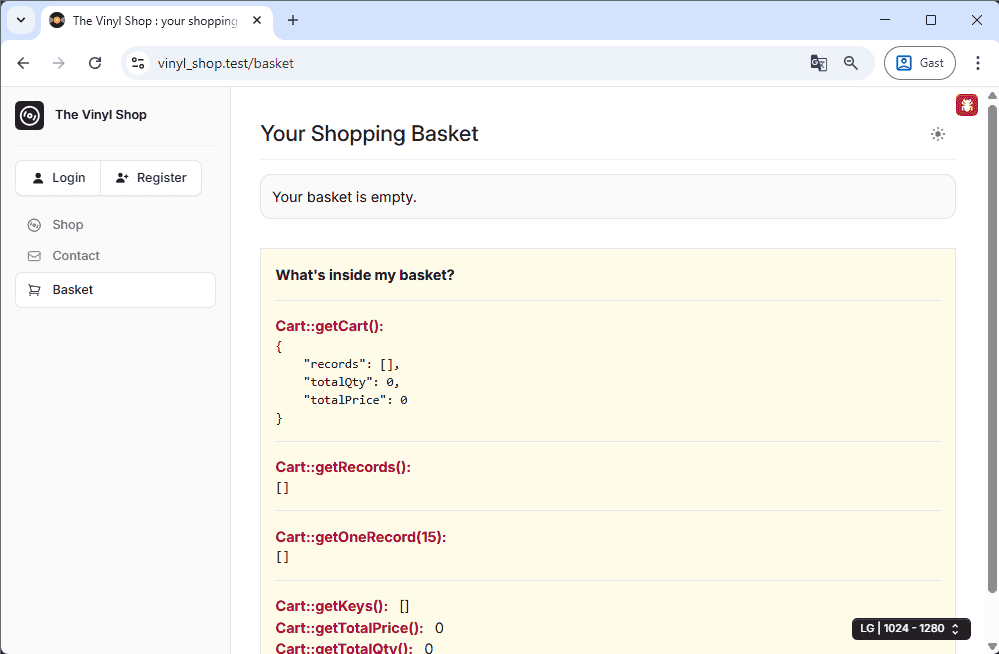
Check for Backorders
A crucial piece of business logic is handling cases where a user wants to order more items than we currently have in stock. We should allow this but clearly inform the user that these items are on backorder.
- app/Livewire/Basket.php
public $backorders = [];: A new public property to hold information about backordered items.private function updateBackorders(): This new method is the core of our backorder logic. It iterates through the items in the cart, compares the requested quantity (qty) with the available quantity (stock) from the database, and calculates any shortage. If a shortage exists, a descriptive string is added to the$backordersarray.- In the
render()method, we now call$this->updateBackorders()at the beginning. This ensures the backorder status is checked and updated on every component refresh.
- resources/views/livewire/basket.blade.php
- At the top of the view, we add a new section.
if(count($backorders) > 0): This condition checks if our backorders array contains any items.- If it does, an error-styled alert is displayed, explaining the situation and listing the specific records and quantities that are on backorder.
php
class Basket extends Component
{
public $backorders = [];
// Decrease the quantity of a record in the basket
public function decreaseQty(Record $record): void { ... }
// Increase the quantity of a record in the basket
public function increaseQty(Record $record): void { ... }
// Empty the basket
public function emptyBasket(): void { ... }
// Check for backorders
private function updateBackorders()
{
$this->backorders = [];
// Loop through the records in the basket and check if the qty is greater than the stock
foreach (Cart::getKeys() as $recordId) {
$cartRecord = Cart::getOneRecord($recordId);
$record = Record::findOrFail($recordId);
$shortage = $cartRecord['qty'] - $record->stock;
Checkout
The final step is the checkout process. We'll guide the user through providing shipping information, and then we'll process the order by saving it to the database and sending a confirmation email.
Create a Form Object for the Shipping Information
To keep our Basket component clean, we'll encapsulate all the shipping form fields, validation, and logic into a dedicated Livewire Form Object.
- Create the form object with the Artisan command:
php artisan livewire:form ShippingForm. - Open
app/Livewire/Forms/ShippingForm.phpand define the properties for the shipping address and their corresponding validation rules.
php
<?php

namespace App\Livewire\Forms;

use Livewire\Attributes\Validate;
use Livewire\Form;

class ShippingForm extends Form
{
    #[Validate('required')]
    public $address = null;
    #[Validate('required')]
    public $city = null;
    #[Validate('required|numeric')]
    public $zip = null;
    #[Validate('required')]
    public $country = null;
    public $notes = null;
}Create a Modal for the Shipping Information
We will use a modal to collect the shipping information without navigating the user away from the basket page.
- app/Livewire/Basket.php
- We introduce two new public properties:
$showModalto control the modal's visibility, andpublic ShippingForm $formto instantiate our new form object. showCheckoutModal(): This method is triggered by the "Checkout" button. It resets the form object, clears any previous validation errors, and sets$showModaltotrue.checkout(): This method will handle the final order submission. For now, it validates the form data using$this->form->validate(), hides the modal, and prepares for the next steps. We'll add the database and email logic here shortly.
- We introduce two new public properties:
- resources/views/livewire/basket.blade.php
- Checkout Button: Inside an
@authdirective (so it's only visible to logged-in users), we add a "Checkout" button that callswire:click="showCheckoutModal()". - Checkout Modal: We add a
<flux:modal>component, its visibility controlled bywire:model.self="showModal". Inside, we create a simple form with inputs for address, city, etc. Each input is bound to our form object usingwire:model.live="form.address". The final button in the modal callswire:click="checkout()".
- Checkout Button: Inside an
php
<?php
namespace App\Livewire;
use App\Helpers\Cart;
use App\Livewire\Forms\ShippingForm;
use App\Models\Record;
use App\Traits\NotificationsTrait;
use Livewire\Component;
class Basket extends Component
{
use NotificationsTrait;
public $backorders = [];
public $showModal = false;
public ShippingForm $form;
public function showCheckoutModal(): void
{
$this->form->reset();
$this->reset('backorders');
$this->resetErrorBag();
$this->showModal = true;
}
public function checkout(): void
{
// validate the form
$this->form->validate();
// hide the modal
$this->showModal = false;
// check if there are records in backorder
$this->updateBackorders();
SPEEDUP TIPS
Testing the full checkout flow repeatedly can be tedious. To accelerate your development and debugging process, are a couple of handy tricks:
- Prevent the Cart from Emptying: To avoid re-adding records to your basket after every test order, temporarily comment out the
Cart::empty();line in thecheckout()method. - Pre-fill the Shipping Form: Instead of manually typing the shipping details each time, you can pre-populate the form with default data. Modify the
showCheckoutModal()method to set these values automatically when the modal opens.
php
public function showCheckoutModal(): void
{
    $this->form->reset();
    $this->reset('backorders');
    $this->resetErrorBag();
    $this->showModal = true;

    // for debugging only
    $this->form->address = 'Kleinhoestraat 4';
    $this->form->city = 'Geel';
    $this->form->zip = '2440';
    $this->form->country = 'Belgium';
    $this->form->notes = "Please leave the package at the back door.\nThank you.";
}Add the Order to the Database
This is where the transaction becomes permanent. We'll take the information from the basket and the shipping form and create corresponding records in our orders and orderlines tables.
Let's break down the database logic. It's a two-part process:
- First, we insert a single new row into the
orderstable. This row will contain theuser_idof the customer and thetotal_pricefor the entire purchase. - After creating this order, we retrieve its newly generated
order_id. - Finally, we loop through every record in the cart session. For each record, we create a new row in the
orderlinestable, using theorder_idfrom the previous step to link it back to the main order.
The relationship looks like this, where one order can have many order lines: 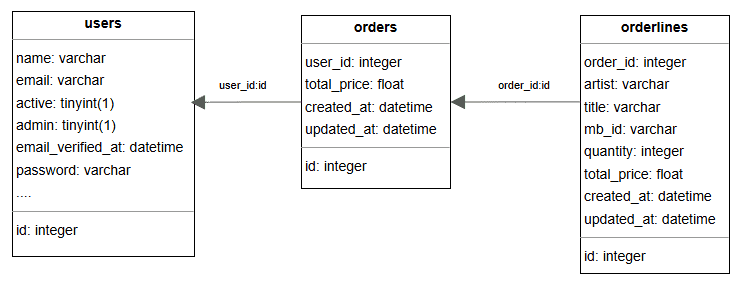
Why duplicate data in Orderlines?
You'll notice the orderlines table duplicates information like artist and title from the records table. This is intentional and crucial for maintaining historical accuracy. If we only stored a record_id, and later the record's price changed or it was deleted, the user's order history would become incorrect. By copying the data at the time of purchase, we create a permanent, unchangeable snapshot of the order.
In the example below: one order contains 3 different records (= 3 orderlines)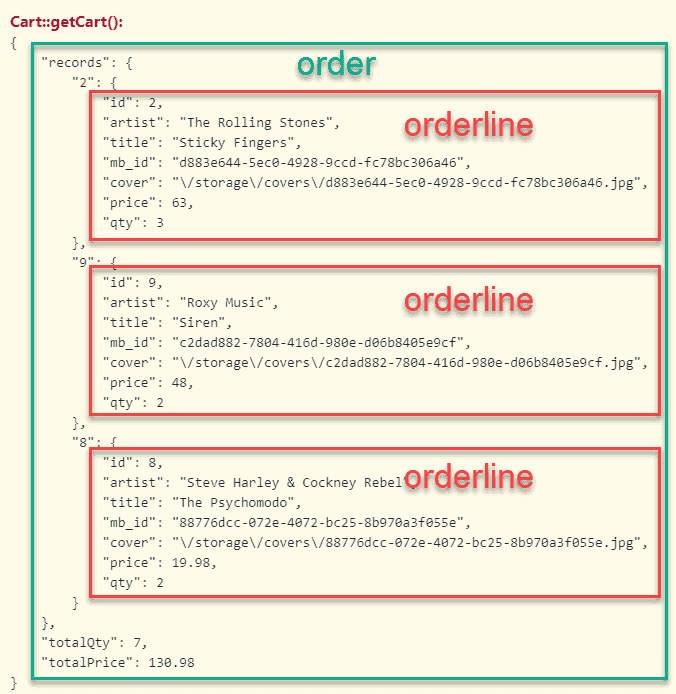
Update the checkout() method in the Basket component:
- app/Livewire/Basket.php
- Inside the
checkout()method, after validation, we perform the following steps:Order::create([...]): A new row is created in theorderstable, storing theuser_idand thetotal_pricefrom the cart. We capture the returnedOrdermodel in the$ordervariable.foreach (Cart::getRecords() as $record): We loop through every item in the cart.Orderline::create([...]): For each item, a new row is created in theorderlinestable. We use the$order->idwe just created to link it to the parent order.- Stock Update: We find the original
Record, decrease itsstockby the quantity ordered, and save the change. A ternary operator ensures the stock never goes below zero.
- Don't forget to import the necessary models at the top of the file:
use App\Models\Order;use App\Models\Orderline;
- Inside the
php
public function checkout(): void
{
    // validate the form
    $this->form->validate();
    // hide the modal
    $this->showModal = false;
    // check if there are records in backorder
    $this->updateBackorders();

    // add the order to the database
    $order = Order::create([
        'user_id' => auth()->user()->id,
        'total_price' => Cart::getTotalPrice(),
    ]);
    // loop over the records in the basket and add them to the orderlines table
    foreach (Cart::getRecords() as $record) {
        Orderline::create([
            'order_id' => $order->id,
            'artist' => $record['artist'],
            'title' => $record['title'],
            'mb_id' => $record['mb_id'],
            'total_price' => $record['price'],
            'quantity' => $record['qty'],
        ]);
        // update the stock
        $updateQty = Record::findOrFail($record['id']);
        $updateQty->stock > $record['qty'] ? $updateQty->stock -= $record['qty'] : $updateQty->stock = 0;
        $updateQty->save();
    }
    // send confirmation email to the user and to the administrators

    // empty the cart
    Cart::empty();
    $this->dispatch('basket-updated');
    // show a confirmation message
    $this->toastSuccess('The records will be shipped as soon as possible.', [
        'heading' => 'Thank you for your order!',
        'position' => 'top-right',
        'icon' => 'check-circle'
    ]);
}Confirmation Email
The final piece of the checkout process is to notify the customer and the shop administrators that a new order has been placed. We'll use Laravel's built-in mail capabilities for this.
First, create a new Mailable class: php artisan make:mail OrderConfirmation --markdown=emails.order-confirmation
- app/Livewire/Forms/ShippingForm.php
- We add a
sendEmail()method to ourShippingFormobject. It's a good fit here since it uses the shipping details. - The method dynamically builds an HTML message string containing the order details, shipping address, and any backorder information.
- It then retrieves all admin users from the database.
- Finally, it uses the
Mailfacade to send theOrderConfirmationmailable to the logged-in user, with the administrators CC'd. - Don't forget to import the necessary classes at the top of the file:
use App\Helpers\Cart;use App\Mail\OrderConfirmation;use App\Models\User;use Mail;
- We add a
- app/Livewire/Basket.php
- Back in the
checkout()method, we now call$this->form->sendEmail($this->backorders);right before emptying the cart. This passes the backorder information to our new email-sending method.
- Back in the
php
<?php
namespace App\Livewire\Forms;
use App\Helpers\Cart;
use App\Mail\OrderConfirmation;
use App\Models\User;
use Livewire\Attributes\Validate;
use Livewire\Form;
use Mail;
class ShippingForm extends Form
{
#[Validate('required')]
public $address = null;
#[Validate('required')]
public $city = null;
#[Validate('required|numeric')]
public $zip = null;
#[Validate('required')]
public $country = null;
public $notes = null;
public function sendEmail($backorder): void
{
$message = '<p>Thank you for your order.<br>The records will be delivered as soon as possible.</p>';
$message .= '<ul>';
foreach (Cart::getRecords() as $record) {
$message .= "<li>{$record['qty']} x {$record['artist']} - {$record['title']}</li>";
}
$message .= '</ul>';
$message .= "<p>Total price: € " . Cart::getTotalPrice() . "</p>";
$message .= '<p><b>Shipping address:</b><br>';
$message .= $this->address . '<br>';
$message .= $this->zip . ' ' . $this->city . '<br>';
$message .= $this->country . '</p>';
$message .= '<p><b>Notes:</b><br>';
$message .= $this->notes . '</p>';
if (count($backorder) > 0) {
$message .= '<p><b>Backorder:</b></p>';
$message .= '<ul>';
foreach ($backorder as $item) {
$message .= "<li>{$item}</li>";
}
$message .= '</ul>';
}
// Get all admins
$admins = User::where('admin', true)->select('name', 'email')->get();
$template = new OrderConfirmation([
'message' => $message,
]);
Mail::to(auth()->user())
->cc($admins)
->send($template);
}
}Now, let's configure the Mailable class and its view.
- app/Mail/OrderConfirmation.php
- We create a public property
$dataand accept an array in the constructor. This makes the data we passed from the form object available to the email's Blade view.
- We create a public property
- resources/views/emails/order-confirmation.blade.php
- This is the Markdown template for our email.
- It accesses the authenticated user's name and renders the HTML message we constructed. We use
{!! ... !!}to ensure the HTML tags are rendered correctly and not escaped. - IMPORTANT: Do not indent the code in this file, as it can interfere with the Markdown parsing and break the email layout.
php
class OrderConfirmation extends Mailable
{
    use Queueable, SerializesModels;

    public $data;

    /** Create a new message instance. ...*/
    public function __construct($data)
    {
        $this->data = $data;
    }

    /** Get the message envelope. ...*/
    public function envelope(): Envelope { ... }

    /** Get the message content definition. ...*/
    public function content(): Content { ... }

    /** Get the attachments for the message. ...*/
    public function attachments(): array { ... }
}